iPhone · iPad · Mac
Your pottery studio at your fingertips.
Ceramispace is a pottery studio app built exclusively for iPhone, iPad, and Mac. Track your clay and glaze inventory, log every kiln firing, and keep your recipes in one place — so your studio comes with you wherever you go.
Download for Free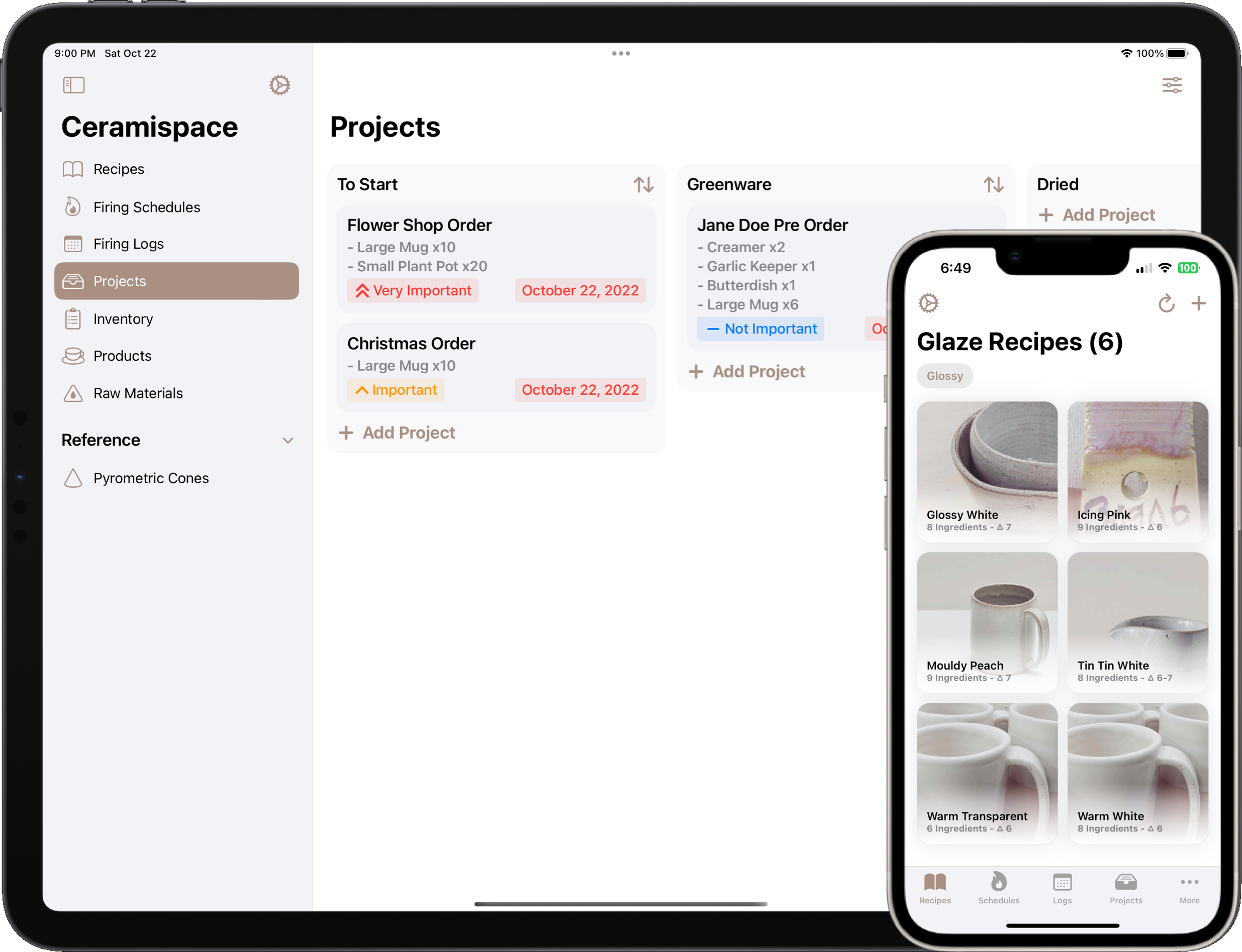
Everything your pottery studio needs in one place
Ceramispace is a ceramic studio tracker for the whole process — glaze recipes, clay inventory, kiln firing logs, and the projects in between — organised elegantly and always at hand on your iPhone, iPad, or Mac.
Glaze Recipes & Batch Scaling
Store all of your glaze recipes in one place, and have new batch sizes calculated within seconds, so there's no reworking percentages by hand. With Ceramispace Pro, each recipe also shows its UMF (unity molecular formula), worked out from the raw materials database, and you can import recipes straight from Glazy.
Kiln Firing Schedules
Have the durations of your firing schedule calculated automatically for you, accompanied with beautiful firing charts. Add your kiln's power and your electricity rate to see roughly what each firing will cost.
Clay & Glaze Inventory
Always know which clay bodies and glaze materials you have on hand and how much is left, wherever you are.
Kiln Firing Log
Log each firing with its kiln, its schedule and how full the kiln was. Add flags, notes and photos of what came out, so you can look back at what worked. Past and upcoming firings sit together, and you'll get a push notification when a firing finishes.
Live Firing Widgets
Get live firing updates directly to your device's home screen.
Track Ongoing Projects
Track your ongoing projects with our highly customizable project boards.
A Record of Every Piece
Give each piece its own record, with photos, the clay and glaze you used, its size and weight, and your notes. It's a pottery journal that stays linked to your projects and glaze recipes.
Add Raw Materials
Add to our large database of raw materials, complete with the molecular composition that UMF analysis in Ceramispace Pro is calculated from.
Sync Across Devices
Your data synchronizes across all of your devices without the need for an account, allowing you to seamlessly transition from one device to the next.
Ready to bring your studio to life?
Join ceramic artists who are managing their studio with Ceramispace — free to download on iPhone, iPad, and Mac.
Download for Free on the App StoreMeet the Makers
Ceramispace was built by a developer and a ceramist — people who understand your craft from the inside out.

Roddy Munro
Specializing in iOS app development, Roddy has 10 years of programming experience under his belt. Roddy has worked on numerous apps for iOS, including Söka, Bleacher Report, and theScore.
appdeco.ca
Danika Vautour
Danika Vautour is a Canadian visual artist based in New Brunswick. She specialises in ceramics and has been working with the material for over 10 years.
danikavautour.caQuestions potters ask
What Ceramispace does, what it doesn't, and where it fits in your studio.
- What is Ceramispace?
- Ceramispace is a pottery studio app for iPhone, iPad, and Mac. It keeps the record-keeping side of a ceramics practice in one place — glaze recipes, raw material and clay inventory, kiln firing logs and schedules, project boards, and finished pieces.
- Can I track my clay and glaze inventory?
- Yes. Ceramispace tracks the raw materials, clay bodies, and glaze materials you have on hand, along with how much of each is left, so you can check stock from your phone while you are at the supplier rather than guessing from memory.
- Does Ceramispace keep a kiln firing log?
- Yes. You can log past firings and schedule upcoming ones. Each firing records its kiln, its schedule and how full the kiln was, and you can add flags, notes and photos of what came out, so you can look back at what worked. Ceramispace calculates the total duration of a firing schedule for you and plots it as a firing chart. Push notifications tell you when a firing finishes, and a Home Screen widget shows the firing in progress, so you are not watching the clock.
- Can I store glaze recipes and scale batch sizes?
- Yes. Store your glaze recipes in Ceramispace and it recalculates the ingredient amounts for any batch size in seconds. Recipes draw on a large built-in database of raw materials with molecular composition, and you can add your own materials to it.
- Can Ceramispace calculate a glaze's UMF, or import recipes from Glazy?
- Yes to both, with Ceramispace Pro. It shows every glaze recipe's UMF (unity molecular formula), worked out from the molecular composition of the raw materials in it, so you can compare glazes by their chemistry rather than by their percentages. If a material in the recipe has no molecular data yet, Ceramispace tells you which one, so you know the UMF may be off. To import from Glazy, paste a Glazy recipe's link, and its name, cone, atmosphere, notes and ingredients come straight in, ready to scale to any batch size.
- What should I record in a kiln firing log?
- A useful firing log captures the date, which kiln you used, the target cone or peak temperature, each segment of the firing schedule (ramp rate, target temperature, and any hold), what was in the load, and how the results came out. Recording this consistently is what lets you trace an underfired shelf or a crawling glaze back to its cause. Ceramispace keeps past and upcoming firings together, calculates the total duration of each schedule, and plots it as a firing chart so you can compare firings at a glance.
- How do I scale a glaze recipe to a different batch size?
- Most glaze recipes are written as percentages, with the base ingredients adding up to 100 and colourants or opacifiers listed as additions on top. To mix a batch, multiply each percentage by your dry batch weight and divide by 100 — for a 5,000 g batch, 20% silica becomes 1,000 g, and a 2% colourant addition becomes 100 g. Ceramispace does this for every ingredient at once: enter the batch size you want and the amounts are recalculated instantly.
- Does Ceramispace have a glaze calculator?
- Yes, for the sums you do most. Enter a batch size and it works out every ingredient's weight. With Ceramispace Pro, every recipe also shows its UMF, with its flux and silica to alumina ratios, worked out from the raw materials in it. It isn't full glaze calculation software, though: there are no limit formulas or ingredient substitutions, so for those you'll still want something like Glazy.
- Why use a pottery app instead of a spreadsheet or notebook?
- A notebook or spreadsheet works well for storing information, but it will not do the arithmetic or keep track of time for you. Ceramispace scales glaze batches, works out firing schedule durations, notifies you when a firing finishes, and links glaze recipes to the projects and pieces they were used on — and because it lives on your phone, your recipes and inventory are with you at the supplier or the studio, not just at your desk.
- Can I track pieces from greenware through bisque and glaze firing?
- Yes. Ceramispace's project boards are fully customizable, so you can set them up around the stages you actually work through — thrown, trimmed, bisqued, glazed, finished — and move each project along as it progresses. Link the glaze recipe you used and the firing it went through, and when a piece comes out of the kiln you can see exactly how it got there instead of piecing it together from photos and notebook pages.
- Can I use Ceramispace as a pottery journal?
- Yes. Each piece gets its own record, with photos, the clay and glaze recipe you used, its size, weight and price, and your notes. Add it to a project, and you can follow it across your board and see which firings the project went through, so you're not hunting through your camera roll to work out how a glaze came out.
- Does Ceramispace work on iPad and Mac, or just iPhone?
- All three. Ceramispace is a native app on iPhone, iPad, and Mac rather than a stretched phone app, so the larger iPad and Mac screens give you more room for editing glaze recipes, reading firing charts, and reviewing project boards. Many potters keep an iPad in the studio for logging firings and checking inventory, then plan glaze batches on the Mac — everything syncs between them automatically, with no account needed. Ceramispace is also ready for iPhone Duo: the toolbars and tab bar move to the side bar, layouts stay clear of the fold, and folding or unfolding keeps your place.
- Is Ceramispace available on Android or the web?
- Not currently. Ceramispace is built natively for Apple platforms — iPhone, iPad, and Mac — which is what lets it use features like home screen widgets and iCloud sync. There is no Android or web version at this time.
- Do I need an account, and does my data sync between devices?
- No account is required. Your studio data syncs across your iPhone, iPad, and Mac automatically, so you can log a firing on your phone in the studio and pick it up on your Mac later without signing in to anything.
- How much does Ceramispace cost?
- Ceramispace is free to download from the App Store, so you can set up your materials and try logging a firing before deciding whether it fits your studio. The free version limits how many recipes, firings, kilns and other records you can keep. Ceramispace Pro, an optional subscription, removes those limits and adds UMF analysis, firing statistics and charts, and importing recipes from Glazy.
- Is Ceramispace for individual potters or for studios with members?
- It is built for the working potter or ceramic artist managing their own practice — your recipes, your materials, your kiln, your projects. It is not a class registration or membership billing system, so studios looking to handle student sign-ups and firing fees will want dedicated studio-administration software instead.